It's been a while and for that I apologise, although perhaps many of you are grateful that it's taken 2 months for me to post. Usual stuff, I know you're all up against the same things. Deadlines, massive development schedules, testing, meetings... you know, real-world stuff.
I wanted to get back into this by explaining briefly why I chose IP*Works! from /n software. It came about because part of our payroll product needed to consume a web service written by (or for) the UK's revenue department, HMRC.
Version 1 of this web service was more basic than its successor, and as a result the standard SOAP Web Services tools that came with Delphi 6 were sufficient to do the job. Good old Delphi does the trick again, out of the box.
A year or so after version 1, the whole HMRC service was redesigned and so version 2 of the web service was born. Whilst it remained on the SOAP platform (due to a unanimous decision from the software developers that had to ultimately consume it), they introduced an element into version 2 that Delphi 6 did not handle: SOAP headers.
At this point, I had 3 options. Option 1 was to move to Delphi 7 in which support for SOAP headers was introduced as standard. Option 2 was to try the Indy Soap which also claimed to support SOAP headers. Option 3 was to buy a third-party product.
My preferred option was number 2, not least because it enabled me to stay with the version of Delphi I was on and we were already using the awesome Indy components for other HTTP, FTP and SMTP work. However, I failed 100% to even get this code to compile despite the help of the indy-soap-public Yahoo group. I decided this was going to be too much of a battle to even get started and so investigated option 1, upgrading Delphi.
This was a tricky decision, because although Delphi 7 would have given me what I needed, Delphi 2005 had been released by then. I felt that it would be ridiculous to spend all the time and effort moving from D6 to D7, along with upgrading all the third-party tools, etc, when it wasn't even the latest release. But I couldn't justify at that time a move to D2005 because it was taking a knock amongst its users, the cost was much higher and, crucially, I couldn't get a definitive answer on whether the SOAP stuff from D6/7 would work in D2005.
After coming to the disappointing decision that I wasn't going to upgrade from Delphi 6 at this time, and with development time running out, option 3 remained: a third-party tool. This was my least preferred for reasons I have explained in earlier posts: I don't like tabs and tabs of third-party components when I could have used a standard one. However, sometimes the guys who write these third-party tools are experts and sell stacks of their product for good reason, and IP*Works! fell under this category.
I had to buy the more expensive SSL version because the HMRC web service was run on a secure server but this wasn't a real issue. It essentially meant that I got all of the same components as with the non-SSL version but with the option to use secure communications or not.
IP*Works! SSL V6 Delphi Edition (still the current release) is a terrific product and I got the secure web service running within days, including all the extra SOAP header bits that I'd not been able to do with D6. If I hadn't have had such success with the other Indy components (HTTP, FTP, SMTP, etc) then I would have used the IP*Works! ones. It turns out that it was an expensive suite for just using 1 component for one utility, but it is a killer utility that pushed us ahead of the competition for a while.
When (not if) I finally do makr the jump to D2007 or RAD Studio 2007, it's likely I'll try and redo this utility to use Delphi's in-built SOAP objects because that it always my goal, to get back to as few third-party ties as possible. But for now the IP*Works! components are solid, robust, well designed and well documented and this is a purchase I didn't regret.
Although, an asterisk and an exclamation mark in a product's name drives me crazy!
Thursday, 20 September 2007


Friday, 27 July 2007
"Do you have a .net version?"
A reasonably common question we get asked these days in tender documents or over the phone is "is your product written in .net?" or similarly "do you have a .net version of your software?". At this point I bite my tongue, take a breath and try to find out exactly why they've asked such a ridiculous question.
Do they understand what they're asking for? Usually not. A .net "version"? As if we have a normal version AND a special .net version?
At what point did .net become a selling point for software? At what point did .net leave the workshops and magazines and conferences and become something that customers actually believed was a feature? At what point did software resellers start putting on their website "written using .net, Microsoft's latest development platform"?
.net isn't a new platform, it's a "framework" for developers. The end user wouldn't be able to tell if software was written in .net or Win32 because there is no difference to the end-user. There's nothing new in it, nothing fancy or magical, it's just a well-designed foundation for developers to work with. The same one that we as Delphi developers have been using for years. Microsoft brought together years of different technologies and brought them under one roof. Designed by the very man who designed Delphi's OO framework. Nothing new: just the old stuff, revamped and rebadged (oh yeah, with garbage collection added). It's for us, not them.
Another misconception from users/customers/managers is that it's something to do with the internet. I can see why, because the name .net is simply one of the most misleading names in software history. The "net" in .net is a misnomer. It isn't about putting your software into a browser, it's just a rewrite of the Windows development framework. ASP.Net allows you to develop websites, but so did ASP.
A post last year on the Delphi Developer's Group newsgroups asked "Has this whole .net thing been a marketing strategy by MS to boost sales of Visual Studio? Did MS decide Borland, Eclipse and others were encroaching rather too much on the developer tools market and in a brilliant coup de grace has shattered the competition?".
Someone replied, "The thing that annoys me is that .NET is now seen as the latest must-have".
I replied saying how customers are asking if we have a ".net" version and this was well-received as generally the sort of thing customers are asking about.
I'm encouraged, by looking at competitor websites, that almost none of them are developing using .net (or at least their system requirements don't state the .net framework). The more we fight it, the longer they'll have to leave Win32 alone. After all, MS aren't planning to bring the majority of their flagship products across either.
Do they understand what they're asking for? Usually not. A .net "version"? As if we have a normal version AND a special .net version?
At what point did .net become a selling point for software? At what point did .net leave the workshops and magazines and conferences and become something that customers actually believed was a feature? At what point did software resellers start putting on their website "written using .net, Microsoft's latest development platform"?
.net isn't a new platform, it's a "framework" for developers. The end user wouldn't be able to tell if software was written in .net or Win32 because there is no difference to the end-user. There's nothing new in it, nothing fancy or magical, it's just a well-designed foundation for developers to work with. The same one that we as Delphi developers have been using for years. Microsoft brought together years of different technologies and brought them under one roof. Designed by the very man who designed Delphi's OO framework. Nothing new: just the old stuff, revamped and rebadged (oh yeah, with garbage collection added). It's for us, not them.
Another misconception from users/customers/managers is that it's something to do with the internet. I can see why, because the name .net is simply one of the most misleading names in software history. The "net" in .net is a misnomer. It isn't about putting your software into a browser, it's just a rewrite of the Windows development framework. ASP.Net allows you to develop websites, but so did ASP.
A post last year on the Delphi Developer's Group newsgroups asked "Has this whole .net thing been a marketing strategy by MS to boost sales of Visual Studio? Did MS decide Borland, Eclipse and others were encroaching rather too much on the developer tools market and in a brilliant coup de grace has shattered the competition?".
Someone replied, "The thing that annoys me is that .NET is now seen as the latest must-have".
I replied saying how customers are asking if we have a ".net" version and this was well-received as generally the sort of thing customers are asking about.
I'm encouraged, by looking at competitor websites, that almost none of them are developing using .net (or at least their system requirements don't state the .net framework). The more we fight it, the longer they'll have to leave Win32 alone. After all, MS aren't planning to bring the majority of their flagship products across either.
Thursday, 12 July 2007
Business Case for upgrading Delphi
On July 6th, Nick Hodges blogged about a new wiki page he has created entitled the Business Case for Delphi. This is a great idea (admittedly not his own) and for a moment I thought he had stolen my thunder on a topic I've been meaning to write about myself. However, Nick's topic is about why Delphi should be taken on in the first place. Why move? The minimum deployment platform is Windows 2000 and so any Windows 98/Me users could not use the software (according to CodeGear’s site, this hasn’t been confirmed). Note: after I write this, someone added a comment on the Developer's Group newsgroup that they have successfully deployed Delphi 2007 software on Windows 98 and Me with no special code. It could take up to a month to get everything fully migrated across to the new version. This includes all the standard software as well as utilities and plug-ins.
This is not that story.
About 6 weeks ago I wrote an internal document called "The cost & business case for upgrading Delphi". As I have stated before, we're using Delphi 6 here because it is stable, fast and I didn't need any of that .NET junk on my PC. Delphi 7 wasn't considered to be that great a leap from Delphi 6 and so here we stayed. Moreover, it's not just an upgrade of Delphi but also a reinstall of all the third-party components that one uses. And then the time taken to get your environment just right so it's intuitive. There just wasn't enough to make me move.
The first release in all this time that has really caught my eye and made me want to upgrade is Delphi 2007 for Win32. I downloaded a trial and loved it, it was the first time I'd used the new Borland Developer Studio IDE although I've seen it for years in the demos and tutorials. All the new IDE features (code folding, component palette searching, refactoring) made me want to kiss the screen, so I thought I'd put together a list of pros and cons as well as a price so that I could discuss it with the company.
The money wouldn't be the biggest hurdle I'd have to overcome - I'd need to explain why I couldn't move development forward for a particular timeframe whilst I ensured that every application, DLL, plug-in, utility, etc was recompiled successfully and working at least as well as it is now. And then, after all that, we'd be at a stage where the software works exactly the same as it did before I started.
"What, all that time spent and you end up with the same product?", I can anticipate hearing.
But you and I know that it isn't just about that. Time invested there means potentially time saved when we have a much better version of Delphi, an IDE with cool features which supposedly mean I can turn work out faster. Ah, I'm getting them back on side with that one.
So this document, which admittedly was very balanced and not at all as conclusive as I'd have liked (but I was being honest) went to the technical director who, predictably, said, "Doesn't really help either way, does it?". Which was fair. So I posted it on the Developer's Group newsgroups (a UK-based developer's group that we're a member of and that has a private newsgroup) to see what my peers could add to tip the balance. The result was frankly disappointing given that its members and regular contributors are well known magazine authors and conference speakers.
But then I received an email from one of the group's administrators who asked if she could include the document as an article in the next magazine as it would make an interesting discussion. I happily agreed although I had privately thought that if there was to be a discussion, it would have taken place on the newsgroup.
In the meantime, I wanted to discuss it here. I'm going to reproduce snippets of the document below to outline the salient points and then see what you have to add. Do you agree with the points I make, disagree with them, or have things to add to them? Can you tip the balance? My heart wants to move to Delphi 2007 with Software Assurance but my head is wondering if it worth the investment of time and money.
When Delphi 6 was written, there was no Windows XP. We use third-party tools (JEDI) to allow our application to take on the themes supported by Windows XP and Vista. Whilst this particular example is free and the widely accepted alternative, my personal opinion is that the more we move away from third-party support (where Delphi offers the same solution) the better, as it enables future upgrades to be less troublesome.
For many of our third-party components, Delphi 2007 was not available at the time we purchased them. But, in a fortunate turn of events for us, Delphi 2007 fully supports any code written for Delphi 2006 (they called this a “non-breaking release”); this means that most of the third-party components we already own will actually work in Delphi 2007, because they were written up to and including Delphi 2006.
Other reasons to move are not necessarily end-user based, but developer based. In 7 years, CodeGear (formerly Borland) have added dozens of IDE enhancements that would make the life of the developer much easier. Many of these features result in writing faster code, which means things just get done quicker.
Why not move?
Third-party vendors appear to continue to support older versions of Delphi (including v6) because so many users don’t upgrade to the most recent versions.
Tuesday, 3 July 2007
The moving Microsoft standard
When I was first brought into my company to port the software from Unix to Windows, Windows 95 was the latest OS and Microsoft were very proud of it. Although I didn't read any official literature from them at the time, I was already aware from my own use of Windows that there were certain standards to be maintained. Not standards as in quality (heaven forbid), but standards as in consistency. But then, I guess we know Microsoft's record on following the standard.
(Actually I just want to point out that I'm not a died-in-the-wool Microsoft basher, I actually think they have produced some outstanding software, but none of us get out of our chair to compliment people do we, we only complain. Even us Brits).
In "The Windows Interface Guidelines for Software Design" from Microsoft Press, there are sections such as design "consistency" and "forgiveness" and an appendix giving "common navigation...and shortcut keys". This was especially relevant as Microsoft were trying to allow the mouse and the keyboard to be used independently as opposed to having to use them in combination.
I built my software around these common ideas, which wasn't always welcome; Unix, you'll remember or no doubt know, used the [Enter] key for moving between elements on a screen; Windows started to use the previously underused [Tab] key, and left the [Enter] key as the default action key (usually pressing an OK button). This caused all sorts of uproar from our customers who moved from Unix to Windows (usually because their management had wanted them to, not because they'd wanted to!), and on one screen in particular where speed of entry was paramount, we were forced to allow the Enter key to reproduce the effect of the Tab key. It didn't take me long to find how to do this 10 years ago which led me to suspect many people were in the same position.
But I towed the line for the most part and argued the case that "this is how it is done in Windows", and ended the debate. The principle of keeping to a design standard to allow your users to feel comfortable with any software is a good one and although it certainly wasn't introduced by Microsoft, they did make an effort to let developers know it was expected.
So, how is my software doing 10 years on? Well, sadly, it's looking like a Windows 95 application, but given that is deals with mundane day-to-day enterprise tasks, no one is really complaining that the menus or the toolbars aren't covered in colour and pictures. However, this is often a hurdle for the sales pitch and it's laughable how many potential clients sit through our unique selling points or all the items that our software does better than the competitors, and then sit bolt upright when we show them a report with some colours on it, or a screen where a bit of text is highlighted. Usually followed by, "Ooh, I like that; can you customise those colours?".
But my gripe is with the consistency of keyboard shortcuts. And one in particular: Search. F3. Isn't it? It is on our software because in Windows and Office '95, F3 was always "Find...".
Well it still is in Explorer in Windows 2000, XP & Vista (it brings up the File search) and Notepad (brings up the text search). And it used to be in IE5 but in IE6 it brings up the "Search the Web" toolbar which is immensely annoying. Interestingly in IE7, it brings up the page search again like before IE6. Bit of a U-turn. In Windows Media Player, F3 launches the "Search for Media" dialog and in MSN Messenger, it puts the cursor focus into the contact search box. All "find" related.
What about Office? After all it is Office that is actually the one setting the design standards every two years or so, not Windows itself. In Excel, Powerpoint and Access, F3 does nothing, CTRL+F is required to launch "Find". CTRL+F goes way back so I'm OK with that but F3 could have been made to do the same seeing as it is sitting idle. The same CTRL+F keystroke is required in Word, but horror, F3 does something else! Something to do with Autotext that actually either just changes my document or puts a conspicuous message in my status bar that I usually miss.
In Outlook, F3 shows the little Find toolbar, so one out of 5 isn't bad. But wait. What if I'm reading an email and want to search for text in there? F3? CTRL+F? No. F4. F4? But F4 doesn't do anything in any of the other Office programs. And get this, CTRL+F forwards my email. And F3 does nothing so why couldn't they have used that?
This is actually an unforgivable inconsistency from a corporation the size of Microsoft that prides itself in the interoperability of its software. Especially when they have the gaul to produce books on how we should adhere to design consistency.
So now not only does my software not look colourful because I can't keep up with every release of Office, it now doesn't behave like the latest Microsoft software either. So my users are left having to remember the keystrokes for my software, even though I actually set them to MS standards 10 years ago. But then those same users are going to find different strokes even within the Office suite so they've got no hope.
This isn't really a rant just about F3, it's about Microsoft setting a standard and then moving away from it at the next opportunity. The Ribbon toolbar in Office 2007 has split opinion and I can't lend my support to either side because I'm happy with the Office I'm on. But it's a whole new paradigm that users have to get used to. From what I hear, most people like it once they get past the initial fear, but it's a lot to ask people to learn how to use your software, especially when you're the company driving the standard on your own OS. And for us developers to try and keep up, we have to licence the use of the Ribbon? You're having a laugh.
MDI is another concept that MS really pushed to the forefront and my 10-year old software is MDI to the core. They announced some years ago that they would no longer write MDI applications and no longer thought it was a secure model, which is why you now see Word and Excel, etc all open up a separate Window instance for each document/worksheet as opposed to them all being under one parent window like Office 95. Of course you can still switch between them from the Window menu which is a nice touch for those of us who should know better than to get stuck in our ways.
But the real thing that this is about, and what I wanted to ask you, is should we, do we, and how do we keep up with the look of the software. I fall in the camp that I want my software to look native to the version of Windows you're running. To that end, I use buttons that aren't themed in Windows 2000 but take on the common controls theme for XP and Vista. Same for all other controls. And I set my application font to the font of the OS when it runs, so it looks native and not at all clumsy. And in fact this works well, espeically in Vista. A Delphi 6 program running on Vista, still using the default MS Sans Serif font, looks very old. Even with theme support. Change the font to Segoe UI and bingo, it makes a dramatic difference.
However, not all controls are themed, toolbars being one. There isn't a difference between ComCtrl 5 and 6 for these. So that ruins the effect I was getting closer to, where my application doesn't look out of place. I don't want it to look like a Vista or XP app on Windows 2000 (which personally drives me crazy), but some of those controls just don't scale up to allow me to have it both ways.
And of course many people turn the theming off in XP and Vista and go back to Classic; so why should we subject them to the themed buttons when all they want is their old Windows back?
So how are you keeping up with the trends? Are you at all? Have you gone down the route of just designing software that has a look of its own in which case you are your own master, or are you trying to design it so that it fits in? At what point do you let the nice new buttons and other controls creep in, regardless of the OS?
(Actually I just want to point out that I'm not a died-in-the-wool Microsoft basher, I actually think they have produced some outstanding software, but none of us get out of our chair to compliment people do we, we only complain. Even us Brits).
In "The Windows Interface Guidelines for Software Design" from Microsoft Press, there are sections such as design "consistency" and "forgiveness" and an appendix giving "common navigation...and shortcut keys". This was especially relevant as Microsoft were trying to allow the mouse and the keyboard to be used independently as opposed to having to use them in combination.
I built my software around these common ideas, which wasn't always welcome; Unix, you'll remember or no doubt know, used the [Enter] key for moving between elements on a screen; Windows started to use the previously underused [Tab] key, and left the [Enter] key as the default action key (usually pressing an OK button). This caused all sorts of uproar from our customers who moved from Unix to Windows (usually because their management had wanted them to, not because they'd wanted to!), and on one screen in particular where speed of entry was paramount, we were forced to allow the Enter key to reproduce the effect of the Tab key. It didn't take me long to find how to do this 10 years ago which led me to suspect many people were in the same position.
But I towed the line for the most part and argued the case that "this is how it is done in Windows", and ended the debate. The principle of keeping to a design standard to allow your users to feel comfortable with any software is a good one and although it certainly wasn't introduced by Microsoft, they did make an effort to let developers know it was expected.
So, how is my software doing 10 years on? Well, sadly, it's looking like a Windows 95 application, but given that is deals with mundane day-to-day enterprise tasks, no one is really complaining that the menus or the toolbars aren't covered in colour and pictures. However, this is often a hurdle for the sales pitch and it's laughable how many potential clients sit through our unique selling points or all the items that our software does better than the competitors, and then sit bolt upright when we show them a report with some colours on it, or a screen where a bit of text is highlighted. Usually followed by, "Ooh, I like that; can you customise those colours?".
But my gripe is with the consistency of keyboard shortcuts. And one in particular: Search. F3. Isn't it? It is on our software because in Windows and Office '95, F3 was always "Find...".
Well it still is in Explorer in Windows 2000, XP & Vista (it brings up the File search) and Notepad (brings up the text search). And it used to be in IE5 but in IE6 it brings up the "Search the Web" toolbar which is immensely annoying. Interestingly in IE7, it brings up the page search again like before IE6. Bit of a U-turn. In Windows Media Player, F3 launches the "Search for Media" dialog and in MSN Messenger, it puts the cursor focus into the contact search box. All "find" related.
What about Office? After all it is Office that is actually the one setting the design standards every two years or so, not Windows itself. In Excel, Powerpoint and Access, F3 does nothing, CTRL+F is required to launch "Find". CTRL+F goes way back so I'm OK with that but F3 could have been made to do the same seeing as it is sitting idle. The same CTRL+F keystroke is required in Word, but horror, F3 does something else! Something to do with Autotext that actually either just changes my document or puts a conspicuous message in my status bar that I usually miss.
In Outlook, F3 shows the little Find toolbar, so one out of 5 isn't bad. But wait. What if I'm reading an email and want to search for text in there? F3? CTRL+F? No. F4. F4? But F4 doesn't do anything in any of the other Office programs. And get this, CTRL+F forwards my email. And F3 does nothing so why couldn't they have used that?
This is actually an unforgivable inconsistency from a corporation the size of Microsoft that prides itself in the interoperability of its software. Especially when they have the gaul to produce books on how we should adhere to design consistency.
So now not only does my software not look colourful because I can't keep up with every release of Office, it now doesn't behave like the latest Microsoft software either. So my users are left having to remember the keystrokes for my software, even though I actually set them to MS standards 10 years ago. But then those same users are going to find different strokes even within the Office suite so they've got no hope.
This isn't really a rant just about F3, it's about Microsoft setting a standard and then moving away from it at the next opportunity. The Ribbon toolbar in Office 2007 has split opinion and I can't lend my support to either side because I'm happy with the Office I'm on. But it's a whole new paradigm that users have to get used to. From what I hear, most people like it once they get past the initial fear, but it's a lot to ask people to learn how to use your software, especially when you're the company driving the standard on your own OS. And for us developers to try and keep up, we have to licence the use of the Ribbon? You're having a laugh.
MDI is another concept that MS really pushed to the forefront and my 10-year old software is MDI to the core. They announced some years ago that they would no longer write MDI applications and no longer thought it was a secure model, which is why you now see Word and Excel, etc all open up a separate Window instance for each document/worksheet as opposed to them all being under one parent window like Office 95. Of course you can still switch between them from the Window menu which is a nice touch for those of us who should know better than to get stuck in our ways.
But the real thing that this is about, and what I wanted to ask you, is should we, do we, and how do we keep up with the look of the software. I fall in the camp that I want my software to look native to the version of Windows you're running. To that end, I use buttons that aren't themed in Windows 2000 but take on the common controls theme for XP and Vista. Same for all other controls. And I set my application font to the font of the OS when it runs, so it looks native and not at all clumsy. And in fact this works well, espeically in Vista. A Delphi 6 program running on Vista, still using the default MS Sans Serif font, looks very old. Even with theme support. Change the font to Segoe UI and bingo, it makes a dramatic difference.
However, not all controls are themed, toolbars being one. There isn't a difference between ComCtrl 5 and 6 for these. So that ruins the effect I was getting closer to, where my application doesn't look out of place. I don't want it to look like a Vista or XP app on Windows 2000 (which personally drives me crazy), but some of those controls just don't scale up to allow me to have it both ways.
And of course many people turn the theming off in XP and Vista and go back to Classic; so why should we subject them to the themed buttons when all they want is their old Windows back?
So how are you keeping up with the trends? Are you at all? Have you gone down the route of just designing software that has a look of its own in which case you are your own master, or are you trying to design it so that it fits in? At what point do you let the nice new buttons and other controls creep in, regardless of the OS?
Friday, 29 June 2007
Real-world tools #4: JEDI-VCL
For as long as there has been Delphi, there has been Project JEDI: Joint Endeavour of Delphi Innovators (or Endeavor if you're Stateside). Initially it was created in order to write API header conversions for Delphi that weren't provided as standard. APIs such as DirectX, ODBC, MAPI, TAPI and Winsock were written and offered up for free with full source code - this was a labour of love and community, not money. It is Open source, distributed under the MPL 1.1 License. Furthermore, extensions were added to the standard headers that had been provided with Delphi, thus exposing more of Windows' capabilities to Delphi developers.
Soon this gave birth to the JCL, the JEDI Code Library. This was a massive set of utilties and classes that could be used, such as algorithms, conversions and literally hundreds of functions designed to make complex jobs easier. Instead of trying to get to grips with MAPI.pas and sending a mail, why not just call JclSimpleSendMail instead? Just going through the contents page on the help, you get an idea of just how much is available. In fact, there's so many that you just don't know where to begin but it's a good place to start looking if you need some complex string search routine or array sort.
But if the JCL is large then the JVCL (JEDI Visual Component Library) is simply enormous. Across 39 tabs, over 500 visual & non-visual components are installed ranging from improved replacements to standard Delphi components to wizards, gauges and trivial animated clocks and dice.
I said in my post on the TMS Component Pack that I'm not a fan of installing component packs and even though I've known about JEDI for as long as I've worked with Delphi, I only installed it early last year. It has come to the point where it isn't just a messy collection of components thrown together any more, it's a well-thought out and organised collection with "something for everyone", although largely I suspect you won't use 75% of them.
Early versions of the JVCL just had all the components that volunteers had written and submitted bundled together, with little documentation and no organistion. Along the way, they stripped out duplicates and integrated it with the JCL so that code reuse was the norm, not an accident.
Documentation is by their own admission "far from complete", as described in the help file overview: "Because of the size of JEDI-VCL and the fact that writing help takes a lot of time, the help file is currently far from complete, the main reason being that too much work has to be done by just a few people". The help is also available on-line at homepages.borland.com/jedi/jedihelp/ which is great because it is searchable. It also means that you can have a look though the help to see what is in there before deciding whether you want to take the plunge with it.
That said about the documentation, I've seen worse! Usually the stub is there added automatically by the documentation software and just needs padding out. But as several people commented with TMS, because you have the source, you can often go in and see for yourself how to use a method or how to set a property that isn't documented. And unlike TMS, you're actually encouraged to change what might be wrong and submit it back to the team.
There is also an online bug tracker at homepages.borland.com/jedi/issuetracker/main_page.php which uses the Mantis bug tracking system. I don't know who the team is behind it, but it is effective and well maintained, with issues being updated every day.
What you have to remember is that this is free software written and maintained by volunteers for no other gain than to improve the Delphi landscape and perhaps a small sense of personal satisfaction that one gets from seeing their name as part of a large project. And so they should because without all of those people who have contributed even a line of code to the source or the help, the JCL and JVCL simply wouldn't be a viable alternative to the commercial toolsets.
Often once you've installed a component package, you leave it because the installation was a nightmare and you're just glad you've got your IDE stable again - not going through that again! Well, the team behind the JCL and JVCL have obviously been burnt by that too because the installer is simply one of the best I have used on any commercial or non-commercial third-party component. Although it is really best to manually remove any existing installations of JEDI first and really make sure the files are deleted, once that is done then the detailed installer wizard makes putting the new version back on a breeze. You can choose what level of installation you want and the JVCL installer checks to make sure you have a high enough version of the JCL before continuing. I doubt this was easy work but it was worth it because I'm actually prepared to keep up to date with the releases.
This isn't a flawless product though, but I cannot bring myself to criticise a package that hasn't cost me anything and that has cost so many people a lot of their free time and expertise. I now regularly use their code and components; sometimes TMS doesn't have a replacement for a particular component and JEDI does; I'm happy to use these two interchangeably.
Bearing in mind that I am still on Delphi 6, I especially use the TjvImgBtn component which is a replacement for the Delphi TBitBtn. Any of you who have your software themed for XP and Vista will know that the Delphi TButton themes nicely but the TBitBtn and TSpeedButton don't. Although there's a little inconsistency in the JEDI button components, in that some theme and some don't, once I found the JvImgBtn I never looked back. In fact I went through all the software I wrote in the last 8 years and replaced SpeedButtons and BitBtns with this component. Furthermore, it doesn't use the Glyph property but it uses an ImageList and has an ImageIndex property. This has reduced my file sizes greatly, although I used to use an ImageList myself and assign the Glyph property at run-time - but all that code has gone now.
I defy you to install it and then not find useful components. You have to be prepared that it will add nearly 40 new tabs to your component palette and increase the loading and closing time of Delphi. But personally I believe this is a trade-off worth taking and the JEDI toolset has finally come of age. Free doesn't have to mean poor quality.
Soon this gave birth to the JCL, the JEDI Code Library. This was a massive set of utilties and classes that could be used, such as algorithms, conversions and literally hundreds of functions designed to make complex jobs easier. Instead of trying to get to grips with MAPI.pas and sending a mail, why not just call JclSimpleSendMail instead? Just going through the contents page on the help, you get an idea of just how much is available. In fact, there's so many that you just don't know where to begin but it's a good place to start looking if you need some complex string search routine or array sort.
But if the JCL is large then the JVCL (JEDI Visual Component Library) is simply enormous. Across 39 tabs, over 500 visual & non-visual components are installed ranging from improved replacements to standard Delphi components to wizards, gauges and trivial animated clocks and dice.
I said in my post on the TMS Component Pack that I'm not a fan of installing component packs and even though I've known about JEDI for as long as I've worked with Delphi, I only installed it early last year. It has come to the point where it isn't just a messy collection of components thrown together any more, it's a well-thought out and organised collection with "something for everyone", although largely I suspect you won't use 75% of them.
Early versions of the JVCL just had all the components that volunteers had written and submitted bundled together, with little documentation and no organistion. Along the way, they stripped out duplicates and integrated it with the JCL so that code reuse was the norm, not an accident.
Documentation is by their own admission "far from complete", as described in the help file overview: "Because of the size of JEDI-VCL and the fact that writing help takes a lot of time, the help file is currently far from complete, the main reason being that too much work has to be done by just a few people". The help is also available on-line at homepages.borland.com/jedi/jedihelp/ which is great because it is searchable. It also means that you can have a look though the help to see what is in there before deciding whether you want to take the plunge with it.
That said about the documentation, I've seen worse! Usually the stub is there added automatically by the documentation software and just needs padding out. But as several people commented with TMS, because you have the source, you can often go in and see for yourself how to use a method or how to set a property that isn't documented. And unlike TMS, you're actually encouraged to change what might be wrong and submit it back to the team.
There is also an online bug tracker at homepages.borland.com/jedi/issuetracker/main_page.php which uses the Mantis bug tracking system. I don't know who the team is behind it, but it is effective and well maintained, with issues being updated every day.
What you have to remember is that this is free software written and maintained by volunteers for no other gain than to improve the Delphi landscape and perhaps a small sense of personal satisfaction that one gets from seeing their name as part of a large project. And so they should because without all of those people who have contributed even a line of code to the source or the help, the JCL and JVCL simply wouldn't be a viable alternative to the commercial toolsets.
Often once you've installed a component package, you leave it because the installation was a nightmare and you're just glad you've got your IDE stable again - not going through that again! Well, the team behind the JCL and JVCL have obviously been burnt by that too because the installer is simply one of the best I have used on any commercial or non-commercial third-party component. Although it is really best to manually remove any existing installations of JEDI first and really make sure the files are deleted, once that is done then the detailed installer wizard makes putting the new version back on a breeze. You can choose what level of installation you want and the JVCL installer checks to make sure you have a high enough version of the JCL before continuing. I doubt this was easy work but it was worth it because I'm actually prepared to keep up to date with the releases.
This isn't a flawless product though, but I cannot bring myself to criticise a package that hasn't cost me anything and that has cost so many people a lot of their free time and expertise. I now regularly use their code and components; sometimes TMS doesn't have a replacement for a particular component and JEDI does; I'm happy to use these two interchangeably.
Bearing in mind that I am still on Delphi 6, I especially use the TjvImgBtn component which is a replacement for the Delphi TBitBtn. Any of you who have your software themed for XP and Vista will know that the Delphi TButton themes nicely but the TBitBtn and TSpeedButton don't. Although there's a little inconsistency in the JEDI button components, in that some theme and some don't, once I found the JvImgBtn I never looked back. In fact I went through all the software I wrote in the last 8 years and replaced SpeedButtons and BitBtns with this component. Furthermore, it doesn't use the Glyph property but it uses an ImageList and has an ImageIndex property. This has reduced my file sizes greatly, although I used to use an ImageList myself and assign the Glyph property at run-time - but all that code has gone now.
I defy you to install it and then not find useful components. You have to be prepared that it will add nearly 40 new tabs to your component palette and increase the loading and closing time of Delphi. But personally I believe this is a trade-off worth taking and the JEDI toolset has finally come of age. Free doesn't have to mean poor quality.
Wednesday, 27 June 2007
Real-world tools #3: TMS Components
I'm not a fan of component packs. As I said before, I'm a conservative developer who (rightly or wrongly) believes that the less third-party tools I can get away with using the better, purely for future-proofing purposes. When a third-party vendor I already use provides a component similar to some other component I found somewhere, I'll switch to that one to reduce my dependencies. If Delphi then provides that same component as standard in its next version, I'll use that one and thus reduce my dependency again. But it's inevitable that eventually you do have to make use of the terrific toolsets out there because they're there to enhance your applications.
Some aren't so terrific.
For as long as I can remember, Woll2Woll Software ran the same advert in all of the published Delphi magazines with exactly the same screenshot of their InfoPower Suite of components. They have achieved the unenviable by managing to show a product that looks no better in 2007 as it did in 1997. Who in their right mind would buy this product when the screen shots look like this? Is this demo showing the best capability of their component suite?
To be fair, because of this I have never downloaded and trialled this package, and it may be that many of you are using it and couldn't live without it. If so, tell us about it, because I wouldn't go near this looking like a Windows 3.1 application and maybe I'm missing out.
On the other hand, TMS Software and its founder Bruno Fierens have produced some outstanding Delphi components for many many years. I have been using them before there was even a component pack, instead each component could be used and bought individually. The main draw back then was that for non-commercial use, the components were free, without source. I understand this is still the case. But of course I am using them for commercial use, plus I always support other software vendors, and so I have purchased the Component Pack which, quite simply, is outstanding. Especially when you get full source code too.
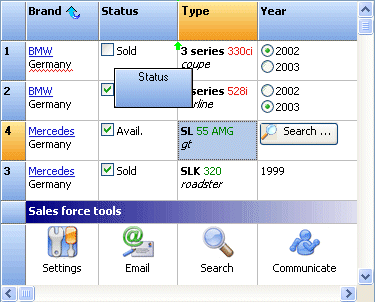 For a staggeringly small €175 (just under £120 or $235 US), the pack contains over 275 components and a year of free updates when they're released, as well as direct email support. Again, I'm not here to promote someone else's business but I am prepared to acknowledge good work and good value for money when I come across it.
In fact it is great work. What started out as a series of Advanced components to replace the Delphi standard components has grown into a business that has seen TMS win award after accolade. The components are never left alone, they're constantly being improved and updated; whilst new components get added all the time to try and keep up with the style that Microsoft have decided to take on with each release of Office.
Whilst many may not care about this (I personally don't use them), and Nick Hodges recently said that CodeGear isn't going to try and play catch up with MS any more, to me it shows that Bruno and co are on the ball, always trying to be first to give you that new "look" should you want to keep your products looking in keeping with what Microsoft call the new standard. This isn't playing catch-up at the expense of the other components, this is simply good sense on their part. I'll talk about the moving-Microsoft-standard another day!
TMS also did themselves a lot of favours by supporting Intraweb almost as soon as it came out. Their Intraweb Pack contains over 70 components to enhance Intraweb applications in the same way they enhance Windows ones. We used them here for a while when we had a browser-based application and they achieved more than we could have done with Intraweb alone. Not only that but they've branched out into ASP.Net, CLX and PocketPC component sets too (although you can't use these with Delphi for .NET as it doesn't support the Compact Framework yet, if ever).
The component pack was runner-up for Best VCL Component Set in the 2002-2004 Delphi Informant Magazine awards, second each time to the ExpressPack by DeveloperExpress. I haven't used these components either but they do look good, and I suspect there is an even split between you regarding which one of these sets you use. Although to my eye they're not necessarily direct competitors as the DevExpress toolset is more about the visual whereas TMS also provides a lot of non-visual components to do donkey-work for you.
At any rate, at least both of them know how to market their products well.
Update: Milan & Paul have made valid points about the documentation and it has been remiss of me to not talk about that in any of my Real-World tools series so far. The documentation in TMS is poor, although sadly this isn't unusual in what I call professional components. ReportBuilder now has excellent documentation and for ODBCExpress, it is acceptable in that the Delphi Help is pretty much all you need. TMS have made the same mistake as Borland did with BDS2005/2006, and to some extent with Delphi 2007 for Win32: that is, not document all of the properties, methods and events. I'm not sure what is worse. TMS omitting them all together or CodeGear having the stub in the help file with no words.
As all of us developers know, documentation comes last but there are so many good tools out there now that can write your documentation for you if you have well-structure code commenting. The JEDI documentation is half missing too but that's free and open source so forgiveable and, in part, up to us to help them with that. It's not forgiveable when you've paid for the components and the technical support falls a bit short (although I've had some good feedback from Bruno via the groups and email in the past).
Some aren't so terrific.
For as long as I can remember, Woll2Woll Software ran the same
advert in all of the published Delphi magazines with exactly the same screenshot of their InfoPower Suite of components. They have achieved the unenviable by managing to show a product that looks no better in 2007 as it did in 1997. Who in their right mind would buy this product when the screen shots look like this? Is this demo showing the best capability of their component suite?To be fair, because of this I have never downloaded and trialled this package, and it may be that many of you are using it and couldn't live without it. If so, tell us about it, because I wouldn't go near this looking like a Windows 3.1 application and maybe I'm missing out.
On the other hand, TMS Software and its founder Bruno Fierens have produced some outstanding Delphi components for many many years. I have been using them before there was even a component pack, instead each component could be used and bought individually. The main draw back then was that for non-commercial use, the components were free, without source. I understand this is still the case. But of course I am using them for commercial use, plus I always support other software vendors, and so I have purchased the Component Pack which, quite simply, is outstanding. Especially when you get full source code too.
For a staggeringly small €175 (just under £120 or $235 US), the pack contains over 275 components and a year of free updates when they're released, as well as direct email support. Again, I'm not here to promote someone else's business but I am prepared to acknowledge good work and good value for money when I come across it.In fact it is great work. What started out as a series of Advanced components to replace the Delphi standard components has grown into a business that has seen TMS win award after accolade. The components are never left alone, they're constantly being improved and updated; whilst new components get added all the time to try and keep up with the style that Microsoft have decided to take on with each release of Office.
Whilst many may not care about this (I personally don't use them), and Nick Hodges recently said that CodeGear isn't going to try and play catch up with MS any more, to me it shows that Bruno and co are on the ball, always trying to be first to give you that new "look" should you want to keep your products looking in keeping with what Microsoft call the new standard. This isn't playing catch-up at the expense of the other components, this is simply good sense on their part. I'll talk about the moving-Microsoft-standard another day!
TMS also did themselves a lot of favours by supporting Intraweb almost as soon as it came out. Their Intraweb Pack contains over 70 components to enhance Intraweb applications in the same way they enhance Windows ones. We used them here for a while when we had a browser-based application and they achieved more than we could have done with Intraweb alone. Not only that but they've branched out into ASP.Net, CLX and PocketPC component sets too (although you can't use these with Delphi for .NET as it doesn't support the Compact Framework yet, if ever).
The component pack was runner-up for Best VCL Component Set in the 2002-2004 Delphi Informant Magazine awards, second each time to the ExpressPack by DeveloperExpress. I haven't used these components either but they do look good, and I suspect there is an even split between you regarding which one of these sets you use. Although to my eye they're not necessarily direct competitors as the DevExpress toolset is more about the visual whereas TMS also provides a lot of non-visual components to do donkey-work for you.
At any rate, at least both of them know how to market their products well.
Update: Milan & Paul have made valid points about the documentation and it has been remiss of me to not talk about that in any of my Real-World tools series so far. The documentation in TMS is poor, although sadly this isn't unusual in what I call professional components. ReportBuilder now has excellent documentation and for ODBCExpress, it is acceptable in that the Delphi Help is pretty much all you need. TMS have made the same mistake as Borland did with BDS2005/2006, and to some extent with Delphi 2007 for Win32: that is, not document all of the properties, methods and events. I'm not sure what is worse. TMS omitting them all together or CodeGear having the stub in the help file with no words.
As all of us developers know, documentation comes last but there are so many good tools out there now that can write your documentation for you if you have well-structure code commenting. The JEDI documentation is half missing too but that's free and open source so forgiveable and, in part, up to us to help them with that. It's not forgiveable when you've paid for the components and the technical support falls a bit short (although I've had some good feedback from Bruno via the groups and email in the past).
Tuesday, 26 June 2007
Windows time change
When I mentioned yesterday about time zones, it reminded me of an issue I came across a few years ago with the Windows WM_TIMECHANGE message.
Whenever the time is changed on Windows, the WM_TIMECHANGE message is broadcast for any applications to handle if they wish. This was something that was extremely useful to us for our Time & Attendance software because it meant, in theory, that if the time changed on the server that was connected to all of the clocking terminals (on which employees swipe their badges), we would receive the Windows message and send out a time change to the terminals immediately.
This worked really well while I was changing the time on the PC manually; the WM_TIMECHANGE message was issued and our software was issuing out the new time to the terminals.
What this was really designed for though was when the clocks go forward and back, between BST (British Summer Time) and GMT. I knew Windows automatically changed the time on the PC as long as the regional settings were correct, and so I wanted to be able to tap into this and have the terminals updated to the new time as soon as the clock change occured.
But guess what... Windows doesn't issue a WM_TIMECHANGE message when it changes the time for daylight savings. Now that's consistency...
Whenever the time is changed on Windows, the WM_TIMECHANGE message is broadcast for any applications to handle if they wish. This was something that was extremely useful to us for our Time & Attendance software because it meant, in theory, that if the time changed on the server that was connected to all of the clocking terminals (on which employees swipe their badges), we would receive the Windows message and send out a time change to the terminals immediately.
This worked really well while I was changing the time on the PC manually; the WM_TIMECHANGE message was issued and our software was issuing out the new time to the terminals.
What this was really designed for though was when the clocks go forward and back, between BST (British Summer Time) and GMT. I knew Windows automatically changed the time on the PC as long as the regional settings were correct, and so I wanted to be able to tap into this and have the terminals updated to the new time as soon as the clock change occured.
But guess what... Windows doesn't issue a WM_TIMECHANGE message when it changes the time for daylight savings. Now that's consistency...
Subscribe to:
Posts (Atom)