OK, so I started with the easy stuff. Installing third-party components.
Raize Components - Check
TMS Component Pack - Check
ReportBuilder Enterprise/Server - Check
OK, these were easy because they were designed for Delphi 2009.
ODBCExpress - Oh. Well, according to its lead developer Pieter Myburg on the support newsgroup, "we have stopped active development of ODBCExpress, and we won't be porting it to future versions of Delphi ourselves".
The last support was for Delphi 2006 which, as I understand, compiles fine in Delphi 2007 as that was a non-breaking release. But not Delphi 2009, oh no. So if anyone out there has any experience with bringing this component set up to Delphi 2009, I would love to hear from you. Without this, we're stumped. It'd be a case of going back through 10 years of software and rewriting it to use dbExpress or ADOExpress. And I seriously don't think we can afford that time.
By the way, bearing in mind I have come from Delphi 6 and have only seen screenshots of the IDE from Delphi 2005 onwards, I really like the IDE. Although I seem to have less code editing space because of all the other (really very useful) palettes that surround it.
Showing posts with label tms. Show all posts
Showing posts with label tms. Show all posts
Thursday, 25 June 2009


Tuesday, 23 June 2009
Bit the bullet: Delphi 2009!
So, I finally bit the bullet and purchased a Delphi upgrade, to D2009. The offer was too tempting and I have started to become frustrated with being left too far behind with Delphi 6.
Thanks to one of the distributors in the UK, Grey Matter, we got the D2009 upgrade for 20% off. This was a promotion they were running for those who didn't want to take advantage of June's "Buy Delphi and get RAD Studio free" promotion. Apart from a slight, but only curious interest in Delphi Prism, there wasn't enough to tempt me, in these economic times, to not take the 20% off instead.
And so I will chronicle my journey to take our 10 year old product, written in Delphi 5 then Delphi 6, to Delphi 2009. The challenges I forsee are more to do with API headers written for some of the hardware devices (clocking terminals) that we support with our T&A product, but time will tell.
To start with, it will be a case of getting the main part of the software converted and see how that goes. I have the latest versions of all our third-party products such as Raize Components 5, TMS Component Pack, ReportBuilder Server & Enterprise 11 and TsiLang Translation.
Could have some fun with older components like the Crystal Reports VCL component for Delphi (for Crystal Reports 7). Anyone got any experience with that?
Should be "interesting"...!
Thanks to one of the distributors in the UK, Grey Matter, we got the D2009 upgrade for 20% off. This was a promotion they were running for those who didn't want to take advantage of June's "Buy Delphi and get RAD Studio free" promotion. Apart from a slight, but only curious interest in Delphi Prism, there wasn't enough to tempt me, in these economic times, to not take the 20% off instead.
And so I will chronicle my journey to take our 10 year old product, written in Delphi 5 then Delphi 6, to Delphi 2009. The challenges I forsee are more to do with API headers written for some of the hardware devices (clocking terminals) that we support with our T&A product, but time will tell.
To start with, it will be a case of getting the main part of the software converted and see how that goes. I have the latest versions of all our third-party products such as Raize Components 5, TMS Component Pack, ReportBuilder Server & Enterprise 11 and TsiLang Translation.
Could have some fun with older components like the Crystal Reports VCL component for Delphi (for Crystal Reports 7). Anyone got any experience with that?
Should be "interesting"...!
Wednesday, 27 June 2007
Real-world tools #3: TMS Components
I'm not a fan of component packs. As I said before, I'm a conservative developer who (rightly or wrongly) believes that the less third-party tools I can get away with using the better, purely for future-proofing purposes. When a third-party vendor I already use provides a component similar to some other component I found somewhere, I'll switch to that one to reduce my dependencies. If Delphi then provides that same component as standard in its next version, I'll use that one and thus reduce my dependency again. But it's inevitable that eventually you do have to make use of the terrific toolsets out there because they're there to enhance your applications.
Some aren't so terrific.
For as long as I can remember, Woll2Woll Software ran the same advert in all of the published Delphi magazines with exactly the same screenshot of their InfoPower Suite of components. They have achieved the unenviable by managing to show a product that looks no better in 2007 as it did in 1997. Who in their right mind would buy this product when the screen shots look like this? Is this demo showing the best capability of their component suite?
To be fair, because of this I have never downloaded and trialled this package, and it may be that many of you are using it and couldn't live without it. If so, tell us about it, because I wouldn't go near this looking like a Windows 3.1 application and maybe I'm missing out.
On the other hand, TMS Software and its founder Bruno Fierens have produced some outstanding Delphi components for many many years. I have been using them before there was even a component pack, instead each component could be used and bought individually. The main draw back then was that for non-commercial use, the components were free, without source. I understand this is still the case. But of course I am using them for commercial use, plus I always support other software vendors, and so I have purchased the Component Pack which, quite simply, is outstanding. Especially when you get full source code too.
 For a staggeringly small €175 (just under £120 or $235 US), the pack contains over 275 components and a year of free updates when they're released, as well as direct email support. Again, I'm not here to promote someone else's business but I am prepared to acknowledge good work and good value for money when I come across it.
In fact it is great work. What started out as a series of Advanced components to replace the Delphi standard components has grown into a business that has seen TMS win award after accolade. The components are never left alone, they're constantly being improved and updated; whilst new components get added all the time to try and keep up with the style that Microsoft have decided to take on with each release of Office.
Whilst many may not care about this (I personally don't use them), and Nick Hodges recently said that CodeGear isn't going to try and play catch up with MS any more, to me it shows that Bruno and co are on the ball, always trying to be first to give you that new "look" should you want to keep your products looking in keeping with what Microsoft call the new standard. This isn't playing catch-up at the expense of the other components, this is simply good sense on their part. I'll talk about the moving-Microsoft-standard another day!
TMS also did themselves a lot of favours by supporting Intraweb almost as soon as it came out. Their Intraweb Pack contains over 70 components to enhance Intraweb applications in the same way they enhance Windows ones. We used them here for a while when we had a browser-based application and they achieved more than we could have done with Intraweb alone. Not only that but they've branched out into ASP.Net, CLX and PocketPC component sets too (although you can't use these with Delphi for .NET as it doesn't support the Compact Framework yet, if ever).
The component pack was runner-up for Best VCL Component Set in the 2002-2004 Delphi Informant Magazine awards, second each time to the ExpressPack by DeveloperExpress. I haven't used these components either but they do look good, and I suspect there is an even split between you regarding which one of these sets you use. Although to my eye they're not necessarily direct competitors as the DevExpress toolset is more about the visual whereas TMS also provides a lot of non-visual components to do donkey-work for you.
At any rate, at least both of them know how to market their products well.
Update: Milan & Paul have made valid points about the documentation and it has been remiss of me to not talk about that in any of my Real-World tools series so far. The documentation in TMS is poor, although sadly this isn't unusual in what I call professional components. ReportBuilder now has excellent documentation and for ODBCExpress, it is acceptable in that the Delphi Help is pretty much all you need. TMS have made the same mistake as Borland did with BDS2005/2006, and to some extent with Delphi 2007 for Win32: that is, not document all of the properties, methods and events. I'm not sure what is worse. TMS omitting them all together or CodeGear having the stub in the help file with no words.
As all of us developers know, documentation comes last but there are so many good tools out there now that can write your documentation for you if you have well-structure code commenting. The JEDI documentation is half missing too but that's free and open source so forgiveable and, in part, up to us to help them with that. It's not forgiveable when you've paid for the components and the technical support falls a bit short (although I've had some good feedback from Bruno via the groups and email in the past).
Some aren't so terrific.
For as long as I can remember, Woll2Woll Software ran the same
 advert in all of the published Delphi magazines with exactly the same screenshot of their InfoPower Suite of components. They have achieved the unenviable by managing to show a product that looks no better in 2007 as it did in 1997. Who in their right mind would buy this product when the screen shots look like this? Is this demo showing the best capability of their component suite?
To be fair, because of this I have never downloaded and trialled this package, and it may be that many of you are using it and couldn't live without it. If so, tell us about it, because I wouldn't go near this looking like a Windows 3.1 application and maybe I'm missing out.
On the other hand, TMS Software and its founder Bruno Fierens have produced some outstanding Delphi components for many many years. I have been using them before there was even a component pack, instead each component could be used and bought individually. The main draw back then was that for non-commercial use, the components were free, without source. I understand this is still the case. But of course I am using them for commercial use, plus I always support other software vendors, and so I have purchased the Component Pack which, quite simply, is outstanding. Especially when you get full source code too.
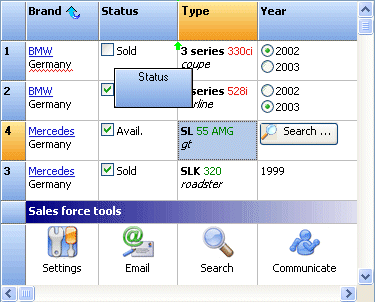 For a staggeringly small €175 (just under £120 or $235 US), the pack contains over 275 components and a year of free updates when they're released, as well as direct email support. Again, I'm not here to promote someone else's business but I am prepared to acknowledge good work and good value for money when I come across it.
In fact it is great work. What started out as a series of Advanced components to replace the Delphi standard components has grown into a business that has seen TMS win award after accolade. The components are never left alone, they're constantly being improved and updated; whilst new components get added all the time to try and keep up with the style that Microsoft have decided to take on with each release of Office.
Whilst many may not care about this (I personally don't use them), and Nick Hodges recently said that CodeGear isn't going to try and play catch up with MS any more, to me it shows that Bruno and co are on the ball, always trying to be first to give you that new "look" should you want to keep your products looking in keeping with what Microsoft call the new standard. This isn't playing catch-up at the expense of the other components, this is simply good sense on their part. I'll talk about the moving-Microsoft-standard another day!
TMS also did themselves a lot of favours by supporting Intraweb almost as soon as it came out. Their Intraweb Pack contains over 70 components to enhance Intraweb applications in the same way they enhance Windows ones. We used them here for a while when we had a browser-based application and they achieved more than we could have done with Intraweb alone. Not only that but they've branched out into ASP.Net, CLX and PocketPC component sets too (although you can't use these with Delphi for .NET as it doesn't support the Compact Framework yet, if ever).
The component pack was runner-up for Best VCL Component Set in the 2002-2004 Delphi Informant Magazine awards, second each time to the ExpressPack by DeveloperExpress. I haven't used these components either but they do look good, and I suspect there is an even split between you regarding which one of these sets you use. Although to my eye they're not necessarily direct competitors as the DevExpress toolset is more about the visual whereas TMS also provides a lot of non-visual components to do donkey-work for you.
At any rate, at least both of them know how to market their products well.
Update: Milan & Paul have made valid points about the documentation and it has been remiss of me to not talk about that in any of my Real-World tools series so far. The documentation in TMS is poor, although sadly this isn't unusual in what I call professional components. ReportBuilder now has excellent documentation and for ODBCExpress, it is acceptable in that the Delphi Help is pretty much all you need. TMS have made the same mistake as Borland did with BDS2005/2006, and to some extent with Delphi 2007 for Win32: that is, not document all of the properties, methods and events. I'm not sure what is worse. TMS omitting them all together or CodeGear having the stub in the help file with no words.
As all of us developers know, documentation comes last but there are so many good tools out there now that can write your documentation for you if you have well-structure code commenting. The JEDI documentation is half missing too but that's free and open source so forgiveable and, in part, up to us to help them with that. It's not forgiveable when you've paid for the components and the technical support falls a bit short (although I've had some good feedback from Bruno via the groups and email in the past).
Wednesday, 20 June 2007
Tools of the real world
I should explain what it is I do with Delphi every day, which will maybe give a background as to why I've become what I consider a conservative developer. Conservative, that is, in terms of what software we use. The company I have worked for for the past 9 years develops three main products (payroll, HR and Time & Attendance, combined as a suite), written for Windows using Delphi.
Although we sell that product, maintain it and enhance it, we also write a lot of bespoke plug-ins and utilities to complement it, for the particular organisation that it is going into.
Given that very simple overview, I'll go on in coming posts to what third-party tools we are using, why we selected them, and maybe why we are still using them even though there might be a better or more up to date alternative.
I think the key point to make is that this is real life. This isn't the ideal world of (the fantastic) Coding Horror, these are real-world, business-oriented decisions that are made because we are under tremendous pressure to deliver, we have a 9 year old project and literally dozens of plug-ins and utilities that rely on consistency throughout.
It also doesn't help that this was only my second job which I started at the age of 23. It turns out I didn't know it all then like I thought I did, and God knows I don't know it all now. So there are some mistakes of youth that are still embedded in the product that occassionally we have to work around. The company have been very good in the past in allowing me an extra month or so to refactor some of the big ones out, even though the end result to the user is no change. Which in the long run is time well spent because future work can then be written a lot faster, neater and cleverer.
It may come as a shock now to learn that, as a base product, we are still using Delphi 6. I will come to why at another time, but it may explain why we're using some of the third-party component sets that we are. I will go through each of these individually over the coming posts, exalting them, damning them or just saying why on earth we're using that one instead of another one. They are:
Although we sell that product, maintain it and enhance it, we also write a lot of bespoke plug-ins and utilities to complement it, for the particular organisation that it is going into.
Given that very simple overview, I'll go on in coming posts to what third-party tools we are using, why we selected them, and maybe why we are still using them even though there might be a better or more up to date alternative.
I think the key point to make is that this is real life. This isn't the ideal world of (the fantastic) Coding Horror, these are real-world, business-oriented decisions that are made because we are under tremendous pressure to deliver, we have a 9 year old project and literally dozens of plug-ins and utilities that rely on consistency throughout.
It also doesn't help that this was only my second job which I started at the age of 23. It turns out I didn't know it all then like I thought I did, and God knows I don't know it all now. So there are some mistakes of youth that are still embedded in the product that occassionally we have to work around. The company have been very good in the past in allowing me an extra month or so to refactor some of the big ones out, even though the end result to the user is no change. Which in the long run is time well spent because future work can then be written a lot faster, neater and cleverer.
It may come as a shock now to learn that, as a base product, we are still using Delphi 6. I will come to why at another time, but it may explain why we're using some of the third-party component sets that we are. I will go through each of these individually over the coming posts, exalting them, damning them or just saying why on earth we're using that one instead of another one. They are:
- ReportBuilder 10 (Digital Metaphors)
- ODBCExpress (Korbitec)
- TMS Component Pack (TMS Software)
- IP*Works! SSL (/n Software)
- Indy 9 (Nevrona)
- JEDI VCL
- Crystal Reports VCL
Subscribe to:
Posts (Atom)